
How to Create a Nonprofit Event with Helptivo
Walk through creating a nonprofit volunteer event on Helptivo. Set up single or recurring signup sheets, enable automatic attendance tracking, and generate participation reports.
Nonprofit work is built on service.
But organizing volunteers? That should not be something nonprofit organizations should be worried about.
Sign-up sheets multiply. Attendance tracking becomes tedious. Staff spend hours confirming participation instead of focusing on the mission.
Nonprofits need structure.
They need automation.
This is where Helptivo steps in.
Step 1: Creating an Event
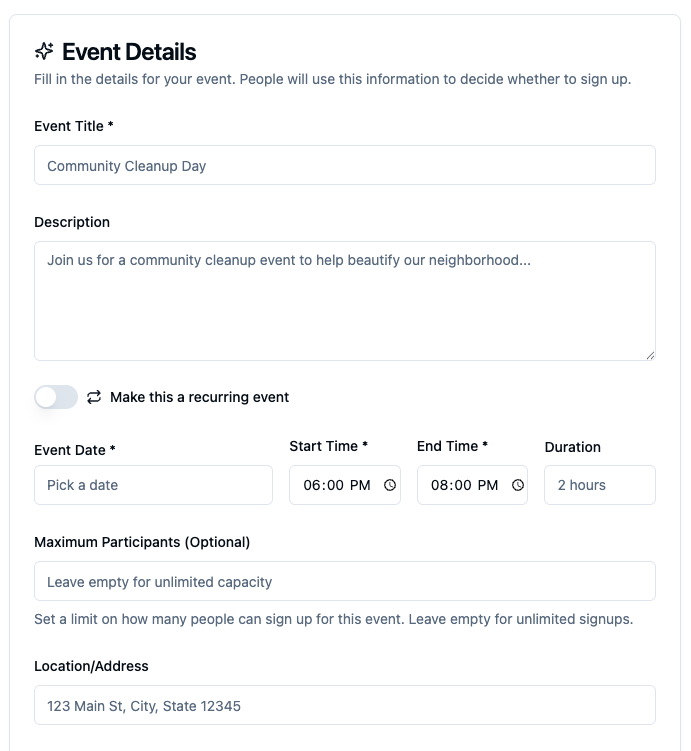
Creating an event in Helptivo
Inside the Helptivo dashboard, staff begin by clicking "Create Event."
They can enter the title, date, time, location, and description. Then they set a capacity limit. Once the limit is reached, registration closes automatically. If the volunteer event happens weekly or monthly, they can enable a recurring schedule. The system automatically generates future sessions without having to repeatedly create new events.
There are options to set custom questions (for example, asking about medical conditions or physical limitations).
The event automatically generates a dedicated event page alongside a QR code and shareable link, which directs members to this page, where they can read full event details and RSVP in one place.
Everything is centralized. No need for constant monitoring, printing out flyers, and sending out Google Forms.
Step 2: Enable Automatic Attendance Tracking
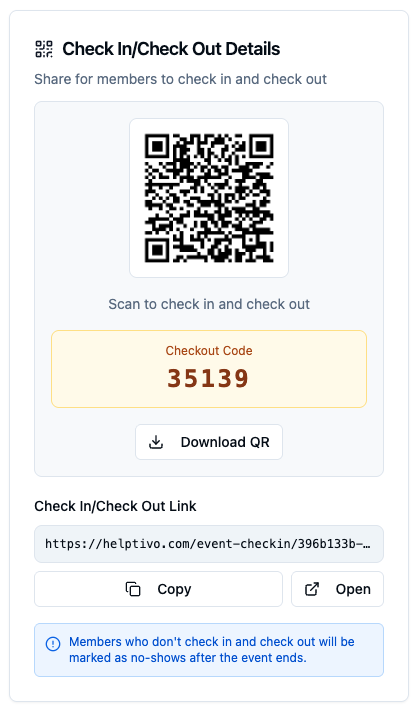
QR check-in code
On the day of the event, staff can display a Check-In QR code at the volunteer site.
Members scan when they arrive. The system records the exact time automatically. At the end of the shift, members scan the Check-Out QR code. Helptivo calculates the exact number of volunteer hours.
What used to require manual time and effort now happens in seconds.
"After our service events, we used to need to stay and sign people's volunteer hour sheets. Now it's automatically recorded."James, Volunteer Coordinator
Once attendance is taken, each member's volunteer hours are automatically added to their individual profile.
Each profile includes:
- Total volunteer hours
- Event attendance history
- Participation records
Staff can see everything in one centralized dashboard.
Step 3: Generate Volunteering Reports
Impact tracking and reporting are important for nonprofits.
Helptivo allows administrators to export clean participation reports with a single click. These reports include verified attendance data, total volunteer hours, and event summaries.
Whether it is for grant applications, board presentations, or impact reports, Helptivo can instantly generate reports, saving organizations time and effort. Instead of having to manually compile numbers from different sources, nonprofits have reliable documentation ready at any time.
Results
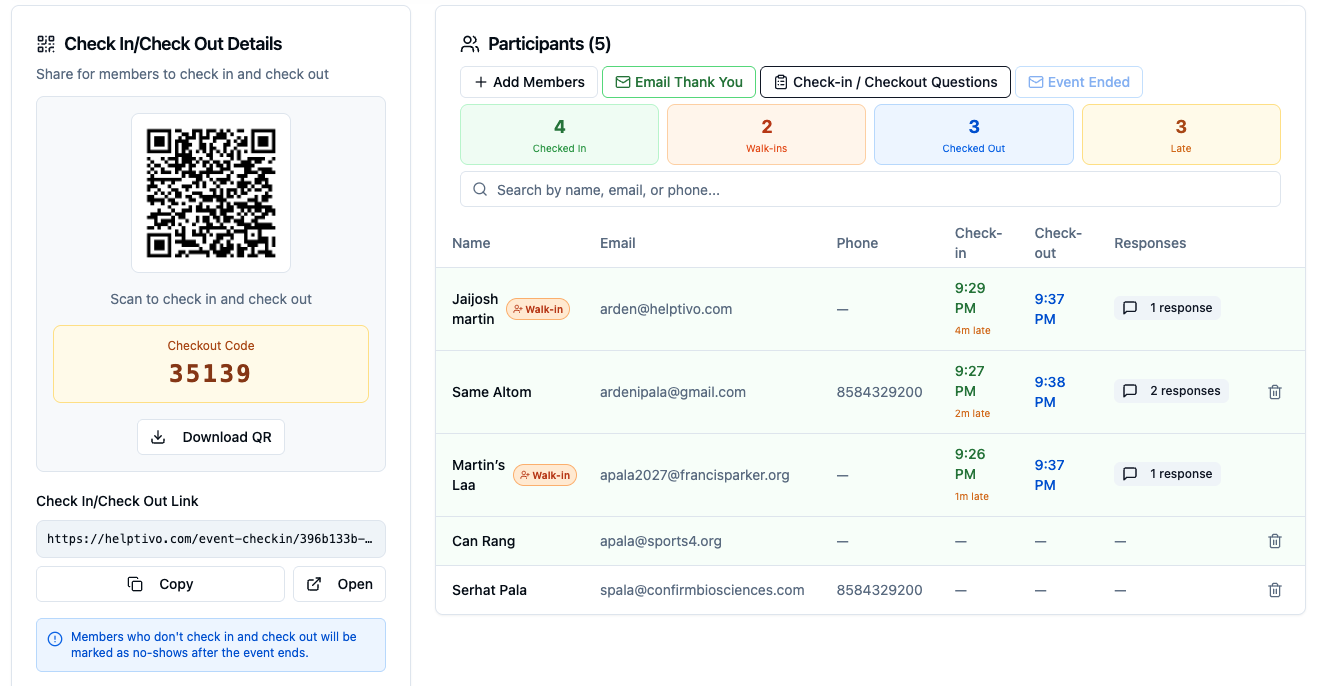
Attendance tracking results in Helptivo
Helptivo transforms nonprofit event management and offers a structured system.
Helptivo takes time and effort away from the boring event management data tracking and focuses more on supporting the mission.
Because when administration runs automatically in the background, nonprofits can lead, serve, and scale their impact with clarity and confidence.
Ready to streamline your nonprofit events?
Start using Helptivo for free. No credit card required.